Blog

Why coworking operators who don’t automate won’t survive

Coworking operators who don't automate won't survive the next 5 years. See why the gap between automated and manual operators widens every quarter.
By The Optix Team
May 8, 2026

Quick Answer: Coworking operators who automate billing, onboarding, member communications, and access keep their teams focused on members and their margins protected. Operators running those tasks manually spend 5 to 6 hours of every working day on non-revenue work, and the gap with automated peers compounds every quarter. Within five years, the dividing line between coworking spaces that scale and those that close will be defined by how much of the operation runs without manual intervention.


What does it mean to automate a coworking operation?

Automation in a coworking operation runs four kinds of work without anyone deciding to run it: billing cycles, onboarding sequences, member communications, and access control. Triggers fire when a new member signs up, an invoice goes overdue, a tour is booked, or a membership status changes. The software layer holds the rules. The team holds the relationships.

The opposite of automation isn’t manual work. It’s manual decisions about when and how to do work. Automated operations remove the decision layer. The system runs recurring work, every time, without prompting.

That’s the structural difference between an automated coworking operation and a manual one. It’s not about replacing people. It’s about taking back the hours people lose to recurring decisions that don’t scale.


Why is automation suddenly a survival issue, not just an efficiency one?

The flex office market is expanding faster than the operators inside it. Cushman & Wakefield’s 2025 research shows 55% of global occupiers using flex space, with 17% planning to increase. Fortune Business Insights projects the market growing from $45.24 billion in 2025 to $194.75 billion by 2034. The macro tailwind is real and accelerating.

At the operator level, that means more demand is coming, but capturing it requires running a leaner business than the one most operators ran in 2020. Lease terms have dropped 37% in five years, according to Commercial Observer, from 121 months to 77 months. Members expect faster fulfilment, better communication, and smoother access. Operators competing on those dimensions while still doing onboarding by hand are losing margin every month they don’t automate.

Five years ago, automation was an efficiency play. Today, it’s the structural difference between operators who scale into the demand and operators who burn out before they can capture it. The window where adapting was a choice is closing.


How much time do coworking operators lose to manual admin?

Coworking operators spend 5.6 out of every 10 working hours on manual tasks. That figure comes from a 2025 Optix operator survey of coworking operators across the US, Canada, UK, Australia, and New Zealand. More than half of every working day burned on tasks that don’t generate revenue.
Each task is five minutes. None of it is catastrophic. But five minutes, dozens of times a day, across every member and every billing cycle, isn’t a minor overhead. It’s a second job running quietly inside the first.

What coworking operators say about automation.

  • 89% say automation’s biggest impact would be operational efficiency
  • 75% would pay for technology that automates 80% or more of their daily admin
  • 63% wish they had more time to build community
  • 52% want to reduce the time they’re physically required to be on-site

Source: Optix Operator Survey

The same survey found 96% of operators are running their coworking software alongside at least one other tool, and most are running four. Manual admin isn’t only about repetitive tasks. It’s about stitching tools together by hand, every day, for every member action.

You can compare these operator-level findings to the broader coworking industry statistics tracked across the sector. The pattern holds: operators who can’t take time back from admin can’t put time into the parts of the business that compound.


Which coworking workflows return the most when automated?

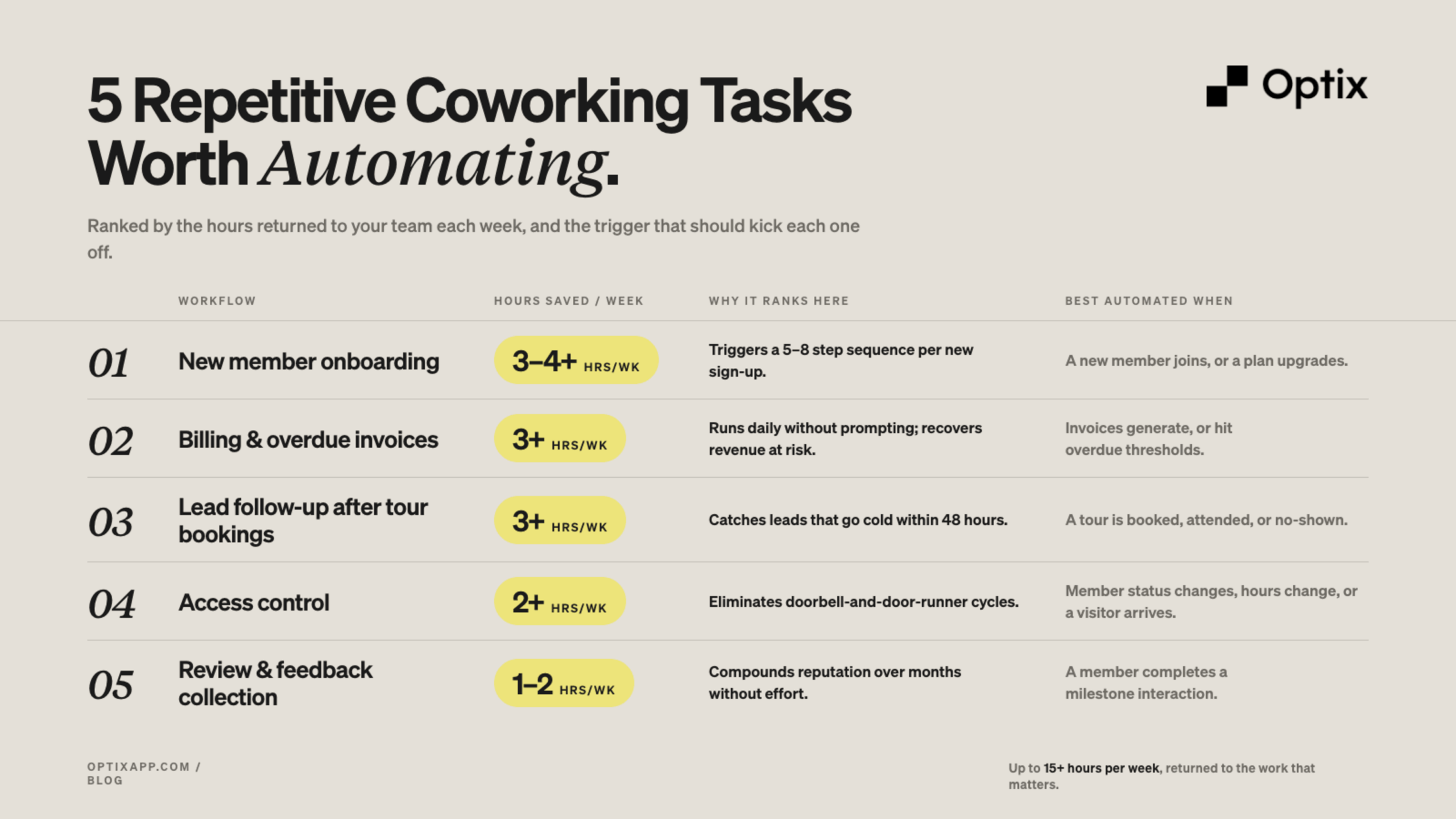
Four workflows give back the most operator hours when automated: new member onboarding, billing and overdue invoices, lead follow-up after tour bookings, and access control. These are the patterns coworking operators ask about most often when they come looking for what to automate first.

Five repetitive coworking tasks worth automating, ranked by hours saved per week
Decision Matrix. Coworking workflows ranked by automation ROI.

The pattern across all of these: automating one workflow doesn’t just save the hours it covers. It frees the cognitive overhead of remembering to do it. Operators describe the unlock as ‘now I have the headspace to think about growing.’ Optix, builds automation for coworking spaces around these exact workflows because they’re the ones operators consistently say buy back the most time.


What happens to coworking spaces that don’t automate?

They run out of operator hours before they run out of demand. Owner-operators end up sending member emails at 5am. Community managers spend 57% of their day inside technology tools rather than with members. New leads cool off within 48 hours, and members notice the friction before they say anything. They cancel.

The macro pattern is well-documented: US office vacancy hit 14.2% in Q1 2025, up more than 400 basis points since 2019, while traditional lease absorption dropped to 5.6 million square feet quarterly versus a 2010s average of 22.9 million, according to Work Design Magazine. The flex sector is absorbing that displaced demand. But absorbing it requires capacity to operate at scale, and operators on manual workflows hit a ceiling defined by how many hours their team can physically work.

KoWorks ran straight into this ceiling and broke through it. Adam Hyman now runs three coworking locations as a solo operator, processing 6,000+ automated actions, 5,000 in-app messages, and onboarding 750 members through Optix’s automation layer. See how KoWorks runs three locations as a solo operator. The alternative wasn’t a smaller, less ambitious version of the same business. It was no business.


Why does the automation gap compound over time?

Each automated workflow saves hours that go back into either growth or recovery. Each manual workflow consumes hours that come out of either growth or recovery. The two compound in opposite directions, every week, for as long as the operator keeps running the same setup. After a year, the gap is hard to close. After three, it’s structural.

'I can look at a graph pretty clearly. Automations for us came in September last year. And if I look at our revenue graph, it goes straight up.'
Adam Hyman, Founder, KoWorks

What Adam describes is the visible end of the compounding effect. The hours he gets back don’t just shave admin off his week. They go directly into growth work that produces revenue, which produces more capacity to invest in members, which produces more retention, which produces more referral growth. The operator still running invoices by hand is still spending those same hours on the same tasks five years from now, with the same revenue ceiling.

Cross-industry research backs this up. Vena Solutions’ 2025 automation analysis found that workplace automation can cut operating costs by roughly 22% on average, with employees recovering somewhere between 240 and 360 hours per year. The compounding part isn’t speculation. It’s measured.


How can coworking operators start automating without a platform overhaul?

Pick one workflow that costs the most hours per week, automate it end-to-end, observe it for two weeks, then add the next. Sequenced beats all-at-once. You don’t need to automate every workflow on day one. You need to start with the highest-cost workflow and add the next only after the first is running cleanly.

Action Checklist. Start automating in 30 days.

1. Pick the workflow that costs you the most hours this week. For most operators, this is new member onboarding or overdue invoice follow-up.

2. Map the steps you currently do by hand. Write down every email, every status change, every reminder, every check.

3. Replace one full sequence end-to-end. Don’t half-automate. A partial sequence still requires a human to remember the rest.

4. Run it for two weeks before adding the next one. This is the part operators most often skip. Stable automations need observation time before you stack more on top.

5. Measure the hours back. Operators who measure their time savings stay committed to the next workflow. Operators who don’t, drift back to manual habits.

6. Repeat with the next-most-expensive workflow.

Coworking management software with built-in automation, like Optix, lets operators move through this sequence without bolting tools together. The point isn’t speed. It’s making each workflow self-running before the next one starts.


What separates coworking operators who scale from those who close?

Operators who scale automate before they need to. They build the operating layer that lets them grow without growing headcount in lockstep, and they have it running before the business hits the ceiling that would force the change.

Le Birdie runs a 24/7 indoor golf facility in Montreal with no on-site staff, processing more than 4,000 sessions in six months from 1,500+ members.

Q Space in Wellington runs 150+ members on a single community manager who spends her time on community building, not invoicing.

KWENCH in Victoria built 30+ live automations covering 5,000+ actions in the first 60 days post-migration.

Operators who close don’t fail because they ran out of demand. They fail because they ran out of operator hours. The team burns out, the service degrades, the members leave, and the lease becomes the line that ends it. The reason this divide is widening isn’t because automation is harder to access. It’s the opposite. Automation is more accessible than it has ever been, which makes the gap between operators who use it and operators who don’t grow faster every quarter.

If you’re running a coworking space and reading this with a list of admin tasks open in another tab, that’s the signal. The operators five years ahead of you on this curve are the ones running their first automation this week. [Book a free demo](https://www.optixapp.com/book-demo/) to see what an automated coworking operation looks like in practice.

Key Takeaways:

  • Manual coworking workflows consume more than half of the average operator’s working day.
  • The flex office market is on track to nearly quadruple by 2034 according to Fortune Business Insights.
  • Onboarding, billing, lead follow-up, and access control return the most hours when automated.
  • Automation gaps compound week over week and become structural inside three years.
  • The fastest path is one workflow at a time, observed for two weeks, then built on.
  • Operators who scale automate before they need to. Operators who close run out of operator hours before they run out of demand.

Frequently asked questions

New member onboarding is usually the highest-leverage starting point. It’s the workflow with the most recurring steps per event, often 5 to 8 actions per new sign-up, and it’s the workflow members judge an operator on first. Automating onboarding gives back 4 to 6 hours per week and removes a major source of inconsistency at the moment of first impression.

Most operators reach a usable automated baseline in 30 to 60 days when they sequence the work. Pick one workflow, automate it end-to-end, run it for two weeks, then add the next. Operators trying to automate everything at once usually stall. The 30-day mark covers the highest-impact workflows for most independent and small-network operators.

Automation typically doesn’t reduce headcount. It changes what staff spend time on. Community managers move from invoicing and reminder emails into community building, retention conversations, and growth work. KoWorks, Le Birdie, and Q Space all use automation to keep small teams focused on members rather than to remove them.

Each automated workflow returns hours to the business; each manual workflow consumes them. After a year, an automated operator has hundreds more hours invested into growth than a manual peer. After three, the gap becomes structural and harder to close. The compounding works in both directions, which is why the divide widens every quarter.

75% of coworking operators say they would pay for technology that automates 80% or more of their daily admin, according to a 2025 Optix operator survey of spaces. The economics typically work because automation pays itself back in recovered staff hours within the first quarter, especially for solo or two-person operator teams.

Workflows that depend on judgement calls or human relationships are hardest, like membership tier disputes, community programming decisions, and member conflict resolution. Workflows with repeated triggers and clear rules, like billing, onboarding, and access, are the easiest. The job isn’t to automate everything. It’s to automate what should never have been manual in the first place.